
TradingView is a charting platform, not a broker, so a TradingView crypto prop trading setup means configuring alerts, layouts, and (on the one platform where it’s possible) order execution to match one specific evaluation account’s rules. It isn’t TradingView’s default settings, and it isn’t a template copied from another trader’s account. Crypto Fund Trader runs its crypto prop trading evaluations on three different platforms: Bybit, MetaTrader 5, and Match-Trader. None of them treat drawdown, profit caps, or allowed pairs the same way, so a setup tuned for one platform can put a trade offside on another without warning.
This guide covers what to configure, in what order, before TradingView touches a live evaluation attempt. TradingView itself is an independent charting service (Crypto Fund Trader doesn’t supply it, host it, or modify it), so the account-specific rules below come from the evaluation’s own terms, not from TradingView’s interface.
Three things need to be in place before any TradingView configuration is worth doing: an active evaluation account, its exact rule set, and a TradingView plan that can hold the alerts that rule set requires.
Each step below does one job. Skipping the order tends to produce a chart that looks right and an alert schedule that doesn’t match the account underneath it.
1. Match your TradingView plan to your alert count, not your budget. Count how many standing alerts your evaluation needs (typically one per loss threshold, one for the profit cap, and a few per active pair) before picking a tier. Account-equity limits still need monitoring in the evaluation dashboard: a price alert only approximates them for a specific position and does not monitor account equity across multiple trades. TradingView’s Essential plan covers 20 price and 20 technical alerts with a two-month expiry for roughly $13 a month when billed annually; Plus raises that to 100 of each (TradingView Pricing). Undercounting here is what leads traders back to the free plan’s one-month alert expiry, which is a bigger problem once this TradingView setup is watching a simulated funded trader account rather than a personal chart.
2. Build a saved layout keyed to your account’s daily reset time. Crypto Fund Trader calculates the daily loss limit against account balance at 12:05 AM UTC and the daily profit cap at 12:10 AM UTC. Set your chart’s session clock to UTC and save a layout that shows both those marks, so a candle boundary on your screen lines up with the moment your account’s numbers reset.
3. Set price alerts at your program’s real loss limits, not a round number. A 1-Phase account runs a 4% daily loss and a 6% trailing overall loss that locks once the account reaches its starting balance; a 2-Phase account runs a 5% daily loss against a 10% fixed overall loss. Build the alert off the account’s own balance, recalculated after every scholarship request or reset, rather than a static percentage carried over from a different program. Both figures describe the same underlying concept: maximum drawdown, the largest peak-to-trough decline an account can post before it’s considered to have failed. CFT enforces it as a hard loss limit rather than a portfolio statistic to review afterward.
4. Add a standing alert for the $10,000 daily and per-trade profit cap. Crypto Fund Trader caps simulated profit at $10,000 per day and per trade; positions above that may be closed and the excess deducted. A price alert at the level where an open position would cross that cap gives you a chance to manage it before the account does it for you.
5. Treat TradingView’s Bybit execution panel as unconfirmed on an evaluation account, and check with support first. Bybit natively lets a connected account place spot and perpetual orders straight from a TradingView chart (Bybit Learn). That’s a Bybit feature, not a Crypto Fund Trader one: CFT’s own Bybit setup page (Crypto Fund Trader x Bybit) and FAQ cover connecting the evaluation’s API key and sub-account, and neither mentions TradingView. Confirm with support before linking it: the API key tying that sub-account to the evaluation “must not be edited, deleted, or replaced,” and CFT’s published instructions don’t say what a TradingView connection would do to it. The general rule holds regardless of what CFT documents: never expose an exchange API key, and check exactly what permissions a new connection is requesting before approving it. MT5 and Match-Trader aren’t on TradingView’s list of connected brokers at all (TradingView Trading), so there TradingView stays a charting layer and orders go in through the platform’s own terminal.
6. Rehearse your program’s specific drawdown type in Bar Replay before it’s live. TradingView’s Bar Replay feature, with intraday history depending on the subscription, lets you step through historical price action candle by candle (TradingView Pricing). Run a few sessions against your actual program’s loss type (fixed for 2-Phase, trailing for 1-Phase) so the first time you watch a trailing floor move is in replay, not on a live evaluation attempt where it counts.
7. Build a rules watchlist note next to your chart, not just a price watchlist. Add a text note or pinned drawing on your layout listing what’s off-limits for your account: no reverse trading on the same asset across two quote currencies, no high-frequency or tick-scalping strategies, and, for Bybit-based crypto prop trading accounts specifically, USDT pairs only, since trades on USDC pairs aren’t counted and spot trading is prohibited. A chart alert tells you where price is; it won’t tell you a trade breaks a rule.
8. Build your TradingView watchlist around what your platform lists, not a generic crypto set. A Bybit evaluation gives access to more than 550 crypto futures pairs, while MT5 and Match-Trader spread more than 720 instruments across crypto, forex, indices, commodities, and stocks (Crypto Fund Trader FAQ). A watchlist pulled from a generic TradingView template can include symbols your platform doesn’t offer. That wastes an alert slot on an account where alert allowances are already limited by plan.
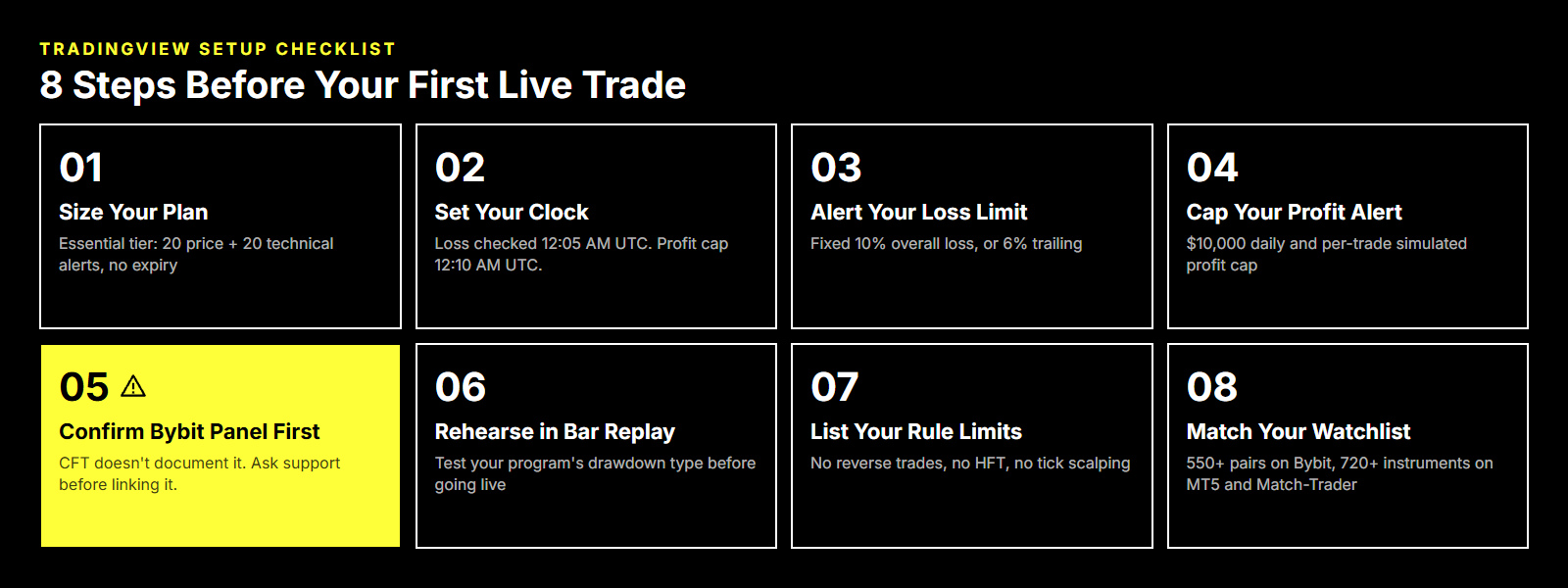
Update to step 01 in the graphic: Essential and Plus alerts expire after two months. Check current alert durations on TradingView’s pricing page.
| Setting | Recommended configuration | Why it matters |
|---|---|---|
| Time zone | UTC, matched to chart session | Daily loss and profit-cap checks run on UTC timestamps (12:05 AM / 12:10 AM) |
| Price alerts | Set at your program’s exact loss thresholds, recalculated after any reset | Generic percentages drift from the account’s real balance |
| Technical alerts | Reserved for entry conditions you’ve backtested, not raw indicator crosses | Keeps the alert count under plan limits and reduces noise during live evaluation |
| Alert expiry | Check and renew alerts: Basic lasts one month; Essential and Plus last two months | Open-ended alerts require a plan that supports them; paid does not automatically mean no expiry |
| Bar Replay | Run against your specific program’s loss type before trading live | Fixed and trailing drawdowns behave differently; the difference is easy to misjudge live |
| Execution panel | Bybit only, confirmed with CFT support first | Undocumented by CFT’s own Bybit setup page; not available for MT5 or Match-Trader; risks the evaluation’s API key if misconfigured |
Plan tiers, alert counts, and Bar Replay availability per TradingView’s pricing page, October 2026. TradingView updates these without notice, so check the current page before relying on a specific number.
Relying on the free plan to monitor an account with a fixed daily check. A price alert that expires after a month, or a plan with no technical alerts at all, leaves gaps on an account where the loss limit is recalculated every single day.
Copying a “best settings” template instead of matching the account’s own numbers. A layout built for someone else’s 2-Phase account, with its fixed 10% overall loss, doesn’t transfer cleanly to a 1-Phase account running a 6% trailing limit that moves as equity climbs.
Assuming the TradingView execution panel works the same way on every platform. It’s a Bybit feature. MetaTrader 5 and Match-Trader accounts still take orders through their own terminals, and treating all three platforms as interchangeable is where a TradingView crypto prop trading setup goes wrong first.
Touching the Bybit API key while wiring up an integration CFT hasn’t documented. The evaluation sub-account connects through an API key that “must not be edited, deleted, or replaced,” but CFT’s own Bybit setup page and FAQ say nothing about TradingView’s execution panel. A connection that regenerates or re-authorizes that key invalidates the account, and nothing in CFT’s published instructions rules that out.
Applying the Break program’s 40% single-day consistency rule everywhere. It’s checked only at scholarship-request time on Break’s Final Stage and doesn’t exist on 2-Phase, 1-Phase, Instant, or Ascend. Building an alert around it on the wrong program is a rule that doesn’t apply.
Ignoring the platform’s country restriction when building the setup. MetaTrader 5 access “is not available to users residing in the United States,” a restriction that has nothing to do with TradingView and everything to do with which platform a US-based trader can use.
None of the steps above change what happens once a trade is placed: they change how much warning a trader gets before an account’s own rules do something about it. TradingView supplies the charting, alerting, and (on Bybit) the execution link; the loss limits, profit caps, and pair restrictions it has to be built around come from the evaluation itself.
Crypto Fund Trader is a simulated trading evaluation firm offering evaluations of up to $300,000 in simulated funded allocation, with the Instant line scaling independently up to $1,280,000. Those are the ceilings the product defines, not projections of what a given setup will produce. A TradingView setup built around a specific program’s actual numbers (checked against Crypto Fund Trader’s own FAQ before each publication, since product lines and limits change without notice) is what turns a generic charting platform into one built for the account it’s watching.
TradingView places trades for you only if you’re on Bybit and you’ve connected it yourself; on MT5 or Match-Trader it’s charting only, full stop. That confusion is one of the most common trip-ups in prop trading generally: firms say “TradingView supported” without saying whether that means execution or just a chart feed, and traders assume the first one. If you’re running a Crypto Fund Trader evaluation on MT5, your orders go in through the MT5 terminal no matter how good your TradingView layout looks. Check which platform your evaluation actually runs on before you build a workflow around clicking buy from a chart.
It depends on your workflow. Basic allows three price alerts, no technical alerts, and a one-month alert duration. Essential adds 20 alerts of each type, but those alerts still expire after two months; Premium and Ultimate support open-ended alerts. Pick a plan around the alerts you need, check expiry dates, and keep monitoring actual account equity in the evaluation dashboard. TradingView alerts supplement that check; they do not replace it.
Treat it as risky until you’ve confirmed otherwise with support. The sub-account key that ties your evaluation to Bybit is explicitly documented as something that must not be edited, deleted, or replaced, and CFT doesn’t spell out what happens if a third-party connection, like TradingView’s execution panel, touches or re-authorizes that key. The safe move is checking with support before you link anything to that specific API key, not after. This is true of exchange API keys generally: know exactly what permissions a new connection is requesting before you approve it.
No, and assuming it does is a common and expensive mistake. That rule is specific to one program’s Final Stage and gets checked only when you submit a scholarship request; it doesn’t exist on the standard 1-Phase, 2-Phase, Instant, or Ascend lines. If you’re trading a program the rule doesn’t apply to, building alerts or trade caps around it is solving a problem you don’t have. Always pull the rule set for your specific program rather than a general prop-firm-rules summary.
Almost certainly, yes. Crypto Fund Trader checks your daily loss and profit numbers against UTC timestamps (12:05 AM and 12:10 AM UTC), and if your TradingView chart is set to your local timezone, your alerts and your account’s actual check times won’t line up. Set your chart’s session clock to UTC and save that as your default layout; it’s a five-minute fix that stops you from misreading where you stand relative to the daily check.
Not without breaking it first. A layout built for someone else’s account almost never matches your own: a 2-Phase account’s fixed 10% overall loss behaves nothing like a 1-Phase account’s 6% trailing limit, so borrowed alert thresholds can be flat-out wrong for your rules. Templates are fine for chart aesthetics (indicators, colors, layout), but loss limits, profit caps, and pair restrictions have to come from your program’s actual numbers. Pull those from your own account’s FAQ or terms, not from a stranger’s screenshot.
SWISS RLCRATES AG is a provider of educational services, all information available on our site is intended solely for the study purposes related to trading on financial markets. Accordingly, we do not offer financial, investment, tax, brokerage or other advice and/or services. Trading in financial markets is a high-risk activity, past performance do not guarantee future ones. It is highly advised not to risk more, than you can afford to lose. Brokers and operators of trading platforms are persons or entities that are separate from SWISS RLCRATES AG and their own terms and conditions will apply when you use their services and products. Neither SWISS RLCRATES AG nor RLCRATES, S.L. (the company that provides services with MT5) operate in countries where crypto or CFD’s activity is not allowed. The content in our platform is applicable to the extent local laws and/or regulations permit. SWISS RLCRATES AG acts as a payment/marketing agent for RLCRATES SL. SWISS RLCRATES AG is not authorized or licensed in Switzerland and does not offer any trading services with MT5 neither conducts any regulated activities.
Crypto Fund Trader has exactly two routes to a bigger simulated account, and they do not combine into a third.
| Route | How size increases | Ceiling |
|---|---|---|
| Standard evaluations (2-Phase, 1-Phase, 3-Phase) | Pass more than one evaluation; account sizes run $5,000 to $200,000 each | $300,000 total simulated allocation per user |
| Instant | Automatic doubling at a profit milestone, no new evaluation purchase required | $1,280,000, with up to three active Instant accounts |
The standard route caps individual accounts at $200,000, so reaching the $300,000 per-user ceiling means holding more than one passed evaluation at once. The Instant route works differently: the account itself grows without a second purchase, up to a ceiling more than four times higher.
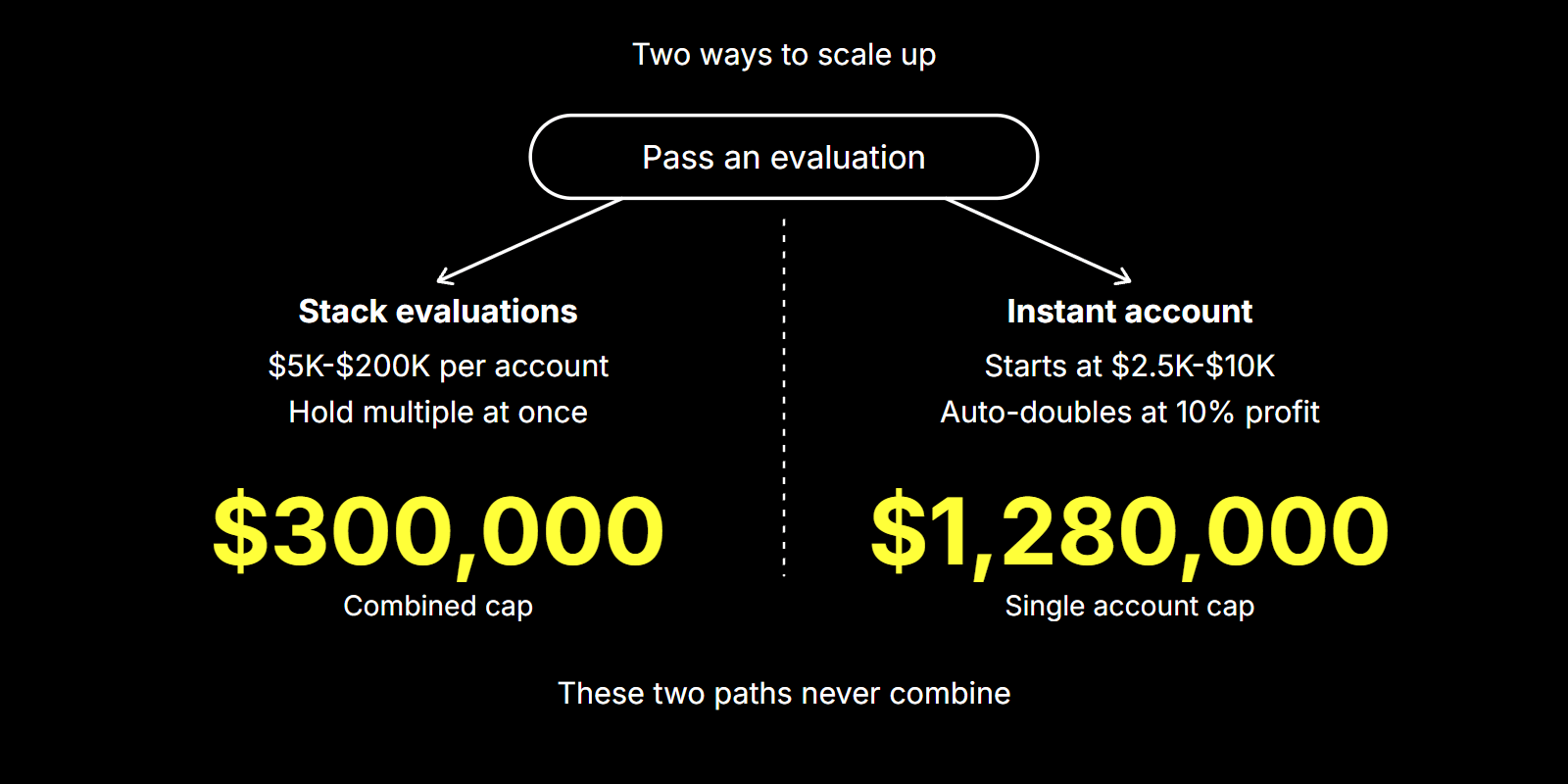
Crypto prop firm scaling on the Instant line runs on a single trigger: reach 10% simulated profit, and the account size doubles.
Crypto Fund Trader calls this the “Withdrawal & Upgrade” step. A trader starts an Instant evaluation at $2,500, $5,000, or $10,000, with no profit target to clear first, only the standing 4% daily and 6% overall loss limits from the first trade. Hitting 10% simulated profit on the current balance triggers the upgrade, which doubles the account’s demo size. Because each step doubles the previous balance, the ladder from a $10,000 starting account is fixed math, not a forecast:
$10,000 → $20,000 → $40,000 → $80,000 → $160,000 → $320,000 → $640,000 → $1,280,000
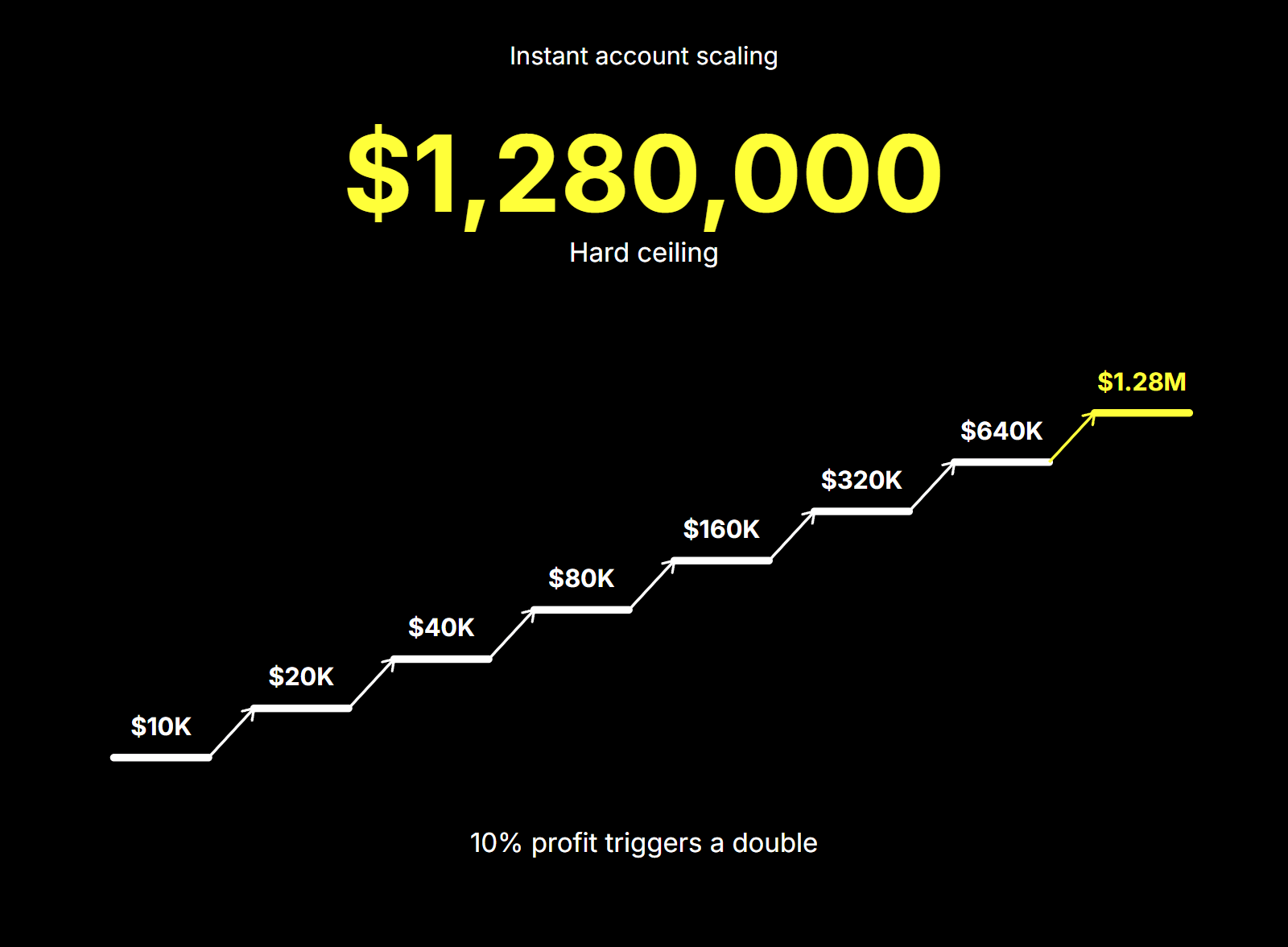
That’s seven doublings to reach the ceiling: arithmetic, not a promise about how fast or whether any account gets there. A trader can also run up to three Instant accounts at once.
A bigger account inherits the same drawdown regime as a smaller one: scaling changes the balance, not the rulebook.
Drawdown on every account is calculated on equity, so an open loss counts against the limit before a position closes, and the daily loss figure resets from the account balance at 12:05 AM UTC each day. A doubled Instant account is still governed by the same 4% daily and 6% overall loss limits it started with. The dollar amounts scale with the balance; the percentages do not. Simulated profit is also capped at $10,000 per day or per trade; equity above that threshold may be closed and the excess deducted.
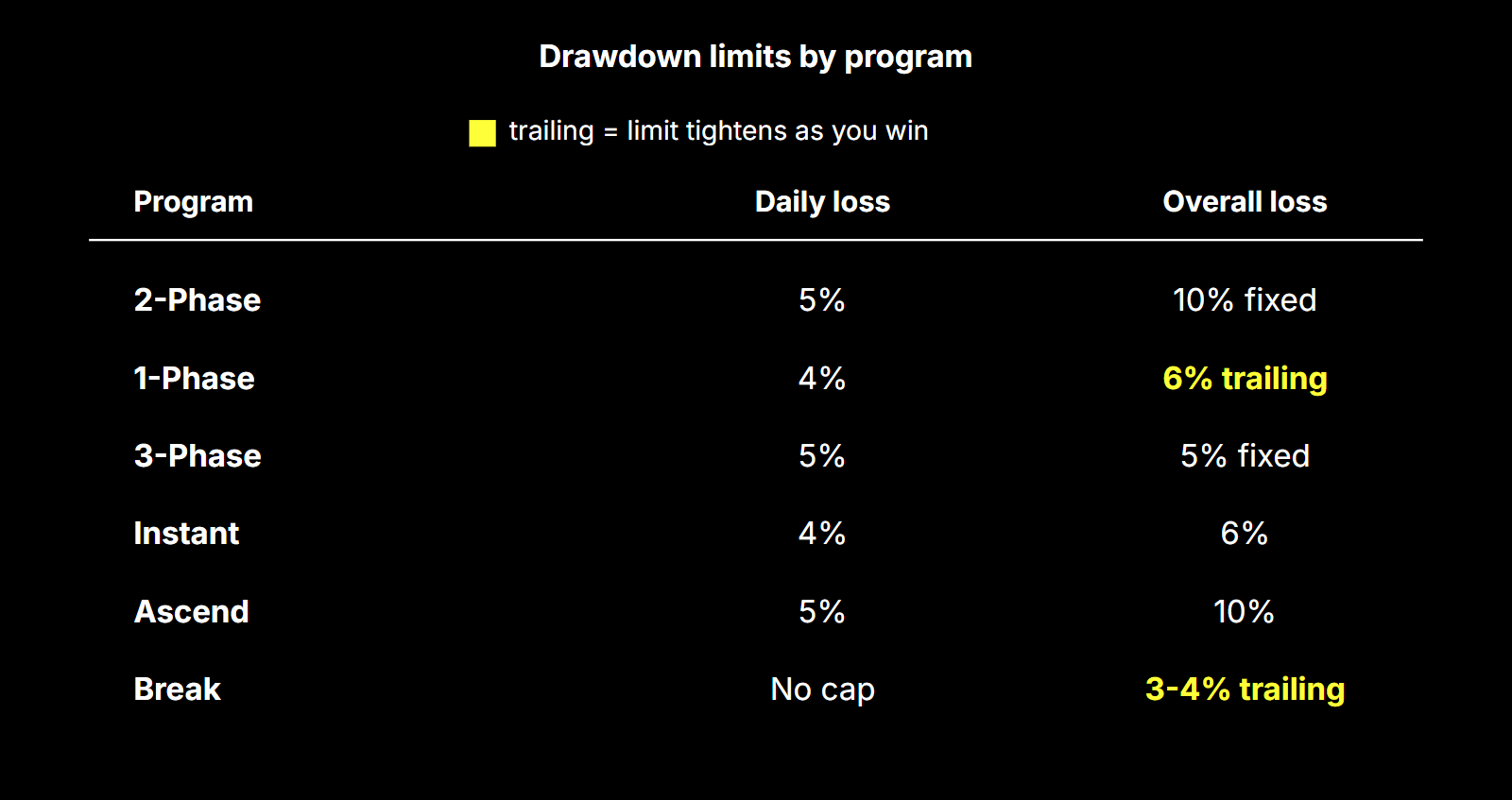
One rule that does not travel across the product line is the Final Stage consistency requirement on Break: no single trading day may account for more than 40% of total profits. It applies only at reward-request time. Reverse trading, account sharing, copy trading restrictions, and KYC requirements also apply regardless of account size.
KYC is a separate gate that scaling does not skip: before any scholarship reward can be processed, KYC must be completed and approved.